
Converting a preset between Helix and HX devices
A Helix preset does not simply open on an HX Stomp: the smaller device has fewer blocks, fewer snapshots, fewer footswitches, and one DSP path instead of two. Helrig converts between them in the browser and tells you every change the target forced, rather than quietly dropping things: you see every change before you load it.
What converts to what
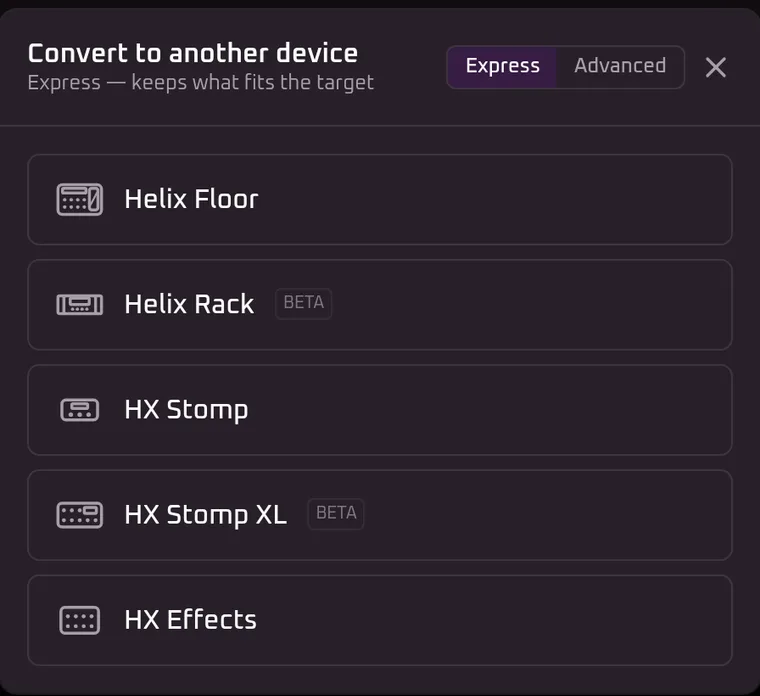
Any of these to any other, in either direction — a preset can be converted to every device except the one it already is:
| Device | Paths | Blocks | Snapshots | Amp / cab |
|---|---|---|---|---|
| Helix Floor | 2 | 16 | 8 | Yes |
| Helix LT | 2 | 16 | 8 | Yes |
| Helix Rack | 2 | 16 | 8 | Yes |
| HX Stomp | 1 | 8 | 3 | Yes |
| HX Stomp XL | 1 | 8 | 4 | Yes |
| HX Effects | 1 | 9 | 4 | No |
Blocks are per path, so a Helix holds 16 on each of two paths and an HX Stomp 8 on its one. That difference is the usual reason a conversion has to change something.
Pick a target
It tells you what it changed
Conversion is lossy by nature, so the result arrives with the losses listed. Converting the bundled sample preset from a Helix LT to an HX Effects gives three:
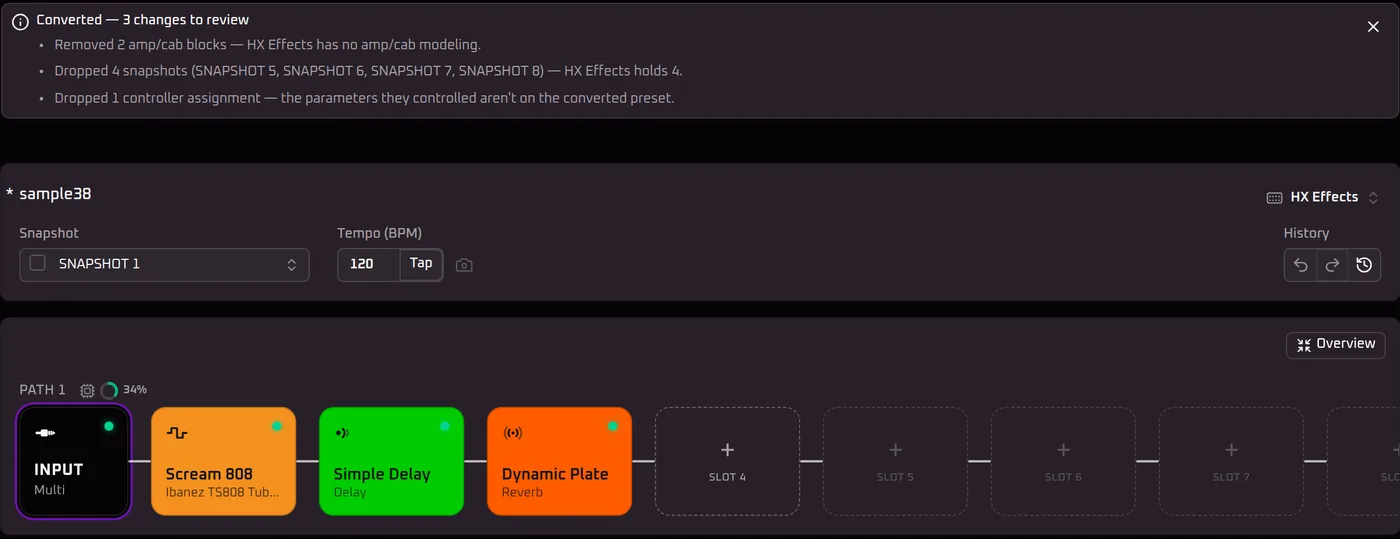
Each kind of change is reported the same way:
- Amp and cab blocks removed when the target is HX Effects, which has no amp, preamp or cab modelling. Impulse responses are kept — HX Effects can load those.
- Snapshots beyond the target’s count, named so you know which ones went.
- Footswitch assignments with no matching switch on the target.
- Controller assignments whose parameters are not on the converted preset.
With the pedal connected and Helrig Connect, Helrig’s appsHelrig’s apps save the converted preset straight to the slot you choose on it.
When it refuses instead
If the chain still has more blocks than the target can hold, Helrig does not pick victims for you. It stops and says how many to remove — “remove at least two blocks to fit HX Stomp” — and you choose which, because only you know which ones the sound depends on.
One case goes the other way. Converting an HX Effects preset to a Helix can leave a ninth block with nowhere to sit on a path that holds eight before the split; rather than drop it, Helrig moves it to Path 2 and feeds it from Path 1, which the Helix has room for and the HX Effects did not.
What carries across, and what cannot
The preset keeps its name, its blocks and their settings, its remaining snapshots, and plain values that mean the same thing on every device — the input gate, output level and pan, and the mixer where two paths rejoin.
What cannot carry is anything device-specific. Input and output routing is stored as a per-device list, and an HX Stomp exposes only some of the inputs a Helix does, so carrying the value across could name a jack the target does not have. The target’s own default is used instead.
The converted preset then exports as a normal .hlx, which loads onto the target device the usual way.
Disclaimer
Helrig is an independent, one-person project. It isn’t built by, affiliated with, or endorsed by Line 6 or Yamaha — “Line 6”, “Helix” and “HX” are their trademarks.