


Helix presets, explained
A Line 6 Helix or HX preset is one complete rig saved as a file. The pages below cover what is inside one, how to move presets between devices and off a backup, and where the DSP goes — all of it read out of real preset files rather than from a manual, because Line 6 does not publish a specification for the format.
What a preset actually is
A preset holds the whole signal chain for one sound: every block and its parameters, the amp and cab pairing, any parallel split across the two DSP paths, and the assignments that make footswitches, snapshots and an expression pedal do something. Change a knob on the device and you are changing the preset.
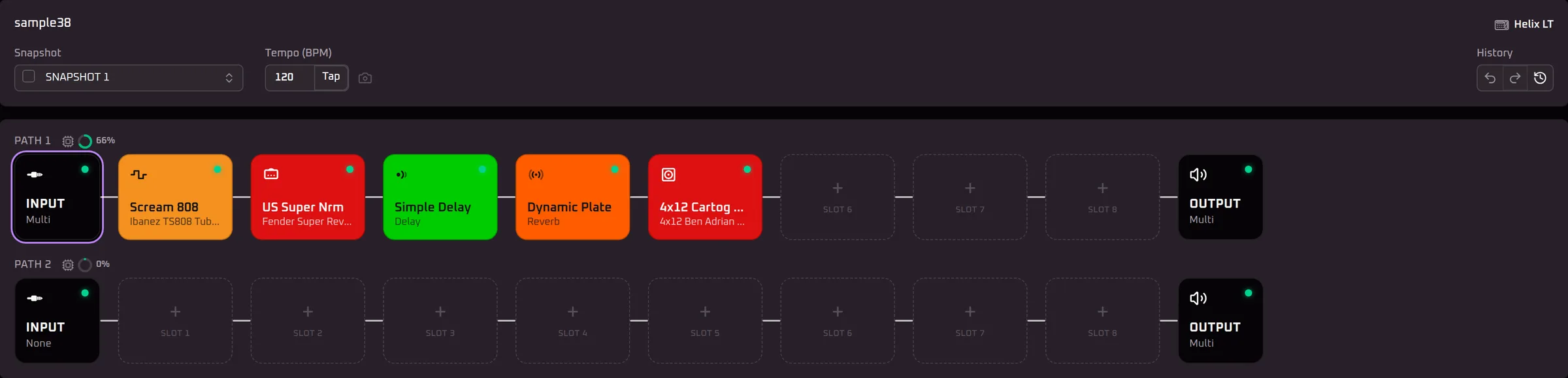
On disk that is a single .hlx file — plain JSON, one preset per file, which is why a preset can be sent to someone else, opened in a text editor, or read by something that is not HX Edit.
Where presets live on the device
The hardware arranges presets into setlists of numbered slots. Some are factory setlists shipped by Line 6, the rest are yours. A real Helix LT backup, for example, holds eight setlists and 356 presets — two factory banks of 128 alongside whatever the owner has built.
Factory presets are not locked. You can edit one exactly like your own: export it, change it, and save the result into a user slot. The factory original stays where it is.
Snapshots are not presets
A snapshot is one saved state within a preset — which blocks are on, and what a handful of parameters are set to. Switching snapshots changes those values inside the preset you are already on rather than loading a different one. A Helix holds eight snapshots per preset, an HX Stomp three, and an HX Stomp XL or HX Effects four.
That difference is one of the reasons a preset does not simply move between devices, and it is the first thing conversion has to reconcile.
The guides
- Free Helix presets, and how to read oneWhere to find free Helix and HX presets, why a preset you cannot see inside is a gamble, and what to check before one goes on your device.
- What is a .hlx file?The format itself: plain JSON, the four top-level keys, what data.tone holds, and how a .hlx differs from a .hxb backup and a .hls setlist.
- Import Helix presets from a backupGetting presets in and out — opening a device backup in the browser and pulling single presets out of it, and why loading one back on is still a device job.
- Convert a preset between devicesMoving a preset from a Helix to an HX Stomp or HX Effects, the per-device limits that force changes, and the list of changes conversion reports back.
- How much DSP does a block use?What each block costs as a share of one path, why stereo costs about double, why bypassing frees nothing, and the separate cab/IR limit nobody mentions.
- Edit Line 6 Helix presets without HX EditWhat a browser can do with a preset when no Line 6 software is installed, and what still needs Line 6's own tools.
- Edit presets on an Android phone or tablet, or an iPadHX Edit is desktop-only. Helrig for Android connects to your pedal over USB; on an iPad or iPhone the editor runs in the browser. What it is like on a touch screen, and how to get a .hlx onto a tablet in the first place.
Disclaimer
Helrig is an independent, one-person project. It isn’t built by, affiliated with, or endorsed by Line 6 or Yamaha — “Line 6”, “Helix” and “HX” are their trademarks.