


Get IRs from TONE3000 onto your Helix or HX
You found an IR on TONE3000 and want it on your pedal. In Helrig you pick it on TONE3000 and it comes straight back to the IR block. One step puts it in the next empty IR slot. No downloads folder, no hunting for a free slot.
Helrig has partnered with TONE3000 to give you access to a massive library of IRs of real analog gear, created by a global community of musicians.
 Powered by TONE3000 →
How it works
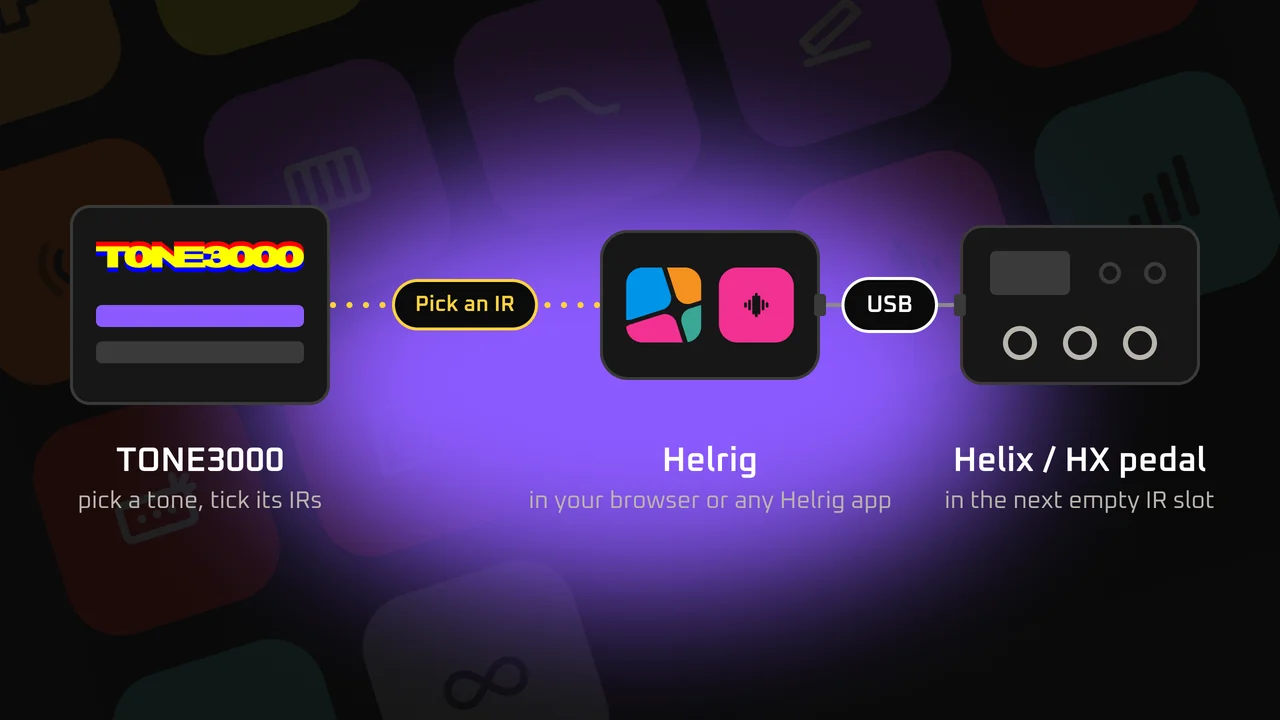
- Open an IR block in Helrig and choose Browse TONE3000. The IRs tab in your library has the same button.
- Sign in with your TONE3000 account. Signing in is free, and Helrig never sees your password.
- Pick a tone on TONE3000. It comes back to Helrig with its IRs, its license and the name of the player who made it.
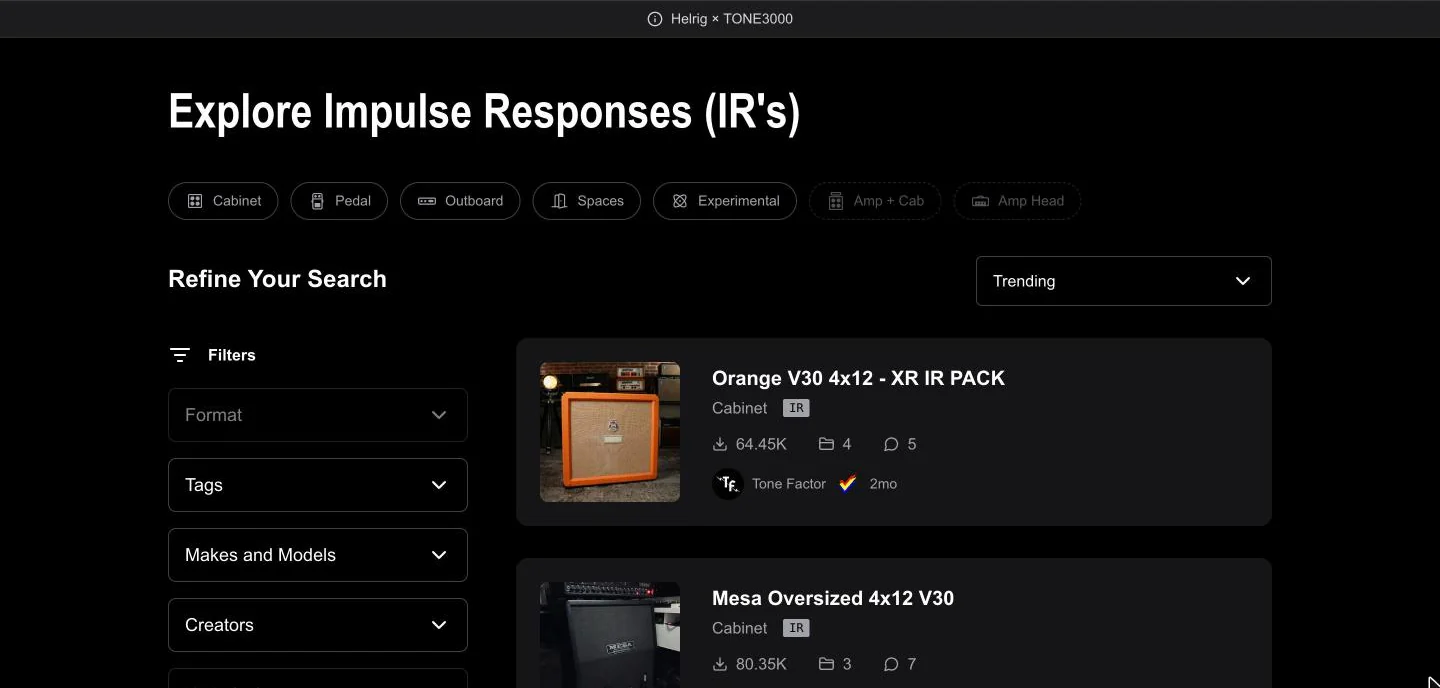
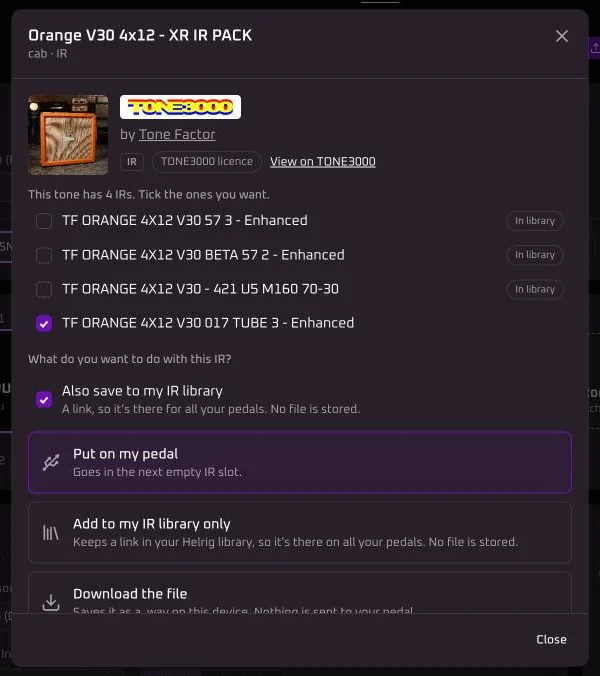
You browse on TONE3000 itself. The banner says it was opened from Helrig. - Tick the IRs you want and choose what happens next:
- Put on my pedal.It goes in the next empty IR slot. If you started from an IR block, that block plays the new IR as soon as it’s on the pedal.
- Add to my IR library. Helrig keeps a link to the tone, so you can put it on your other pedals later.
- Download the file.It’s saved on this device. Nothing goes to the pedal.
Helrig tells you when an IR is already on your pedal, and in which slot, or already in your library. Nothing gets written twice.
What you need
- To browse and download: a free TONE3000 account, and Helrig in your browser or any Helrig app. No Helrig plan needed.
- To put an IR on the pedal:a Helrig app with your pedal connected, and Helrig Connect or Helrig Pro. A browser can’t reach the pedal.
- To keep IRs in your IR library: Helrig Pro.
Licenses and credit
Every tone shows its license and who made it: in the list, on the tone and in your library. Some IRs can be used for anything, some ask you to credit the creator, and some are marked Non-commercial. Check the license before you use an IR on a paid release.
Your IRs and your TONE3000 account
- Helrig doesn’t keep copies of TONE3000 IRs on its servers. Your IR library holds a link to the tone. When the IR goes to a pedal, Helrig downloads it with your own sign-in.
- IRs you put on a pedal stay on the pedal.
- You can disconnect TONE3000 any time. Helrig shows you first what goes: your TONE3000 sign-in on that device and the TONE3000 links in your library. IRs already on a pedal stay there.
Questions
Does it cost anything?
Browsing TONE3000 and downloading IRs from Helrig is free. Putting an IR on your pedal needs Helrig Connect or Helrig Pro, like anything else Helrig writes to the pedal. Keeping TONE3000 IRs in your IR library needs Helrig Pro.
Which pedals does it work with?
The pedals Helrig connects to: Helix Floor, LT and Rack, HX Stomp, HX Stomp XL and HX Effects. A downloaded file works wherever you load IRs.
What happens to a long IR?
The pedal keeps 2,048 samples of each IR at 48 kHz. Helrig converts a longer IR to that when it writes it, so you don't have to trim it first.
Is Helrig part of TONE3000?
No. Helrig has partnered with TONE3000, but it's an independent app: it uses TONE3000's API, and you sign in with your own TONE3000 account.
About TONE3000
TONE3000 is a library of IRs of real gear, shared by players around the world. Visit tone3000.com
More
Helrig is an unofficial, independent project, not affiliated with or endorsed by Line 6 or Yamaha. Line 6, Helix and HX are trademarks of their respective owners. TONE3000 is a trademark of its owner.