


Manage the IRs on your Helix or HX, and take them to every pedal
After a few years, the IR slots on a Helix are full of copies, and nobody remembers which preset needs which IR. Moving them to a second pedal means doing it again by hand. Helrig shows every IR on the pedal and the presets that use it, finds the duplicates, and keeps your IRs in a library you can send to any pedal.
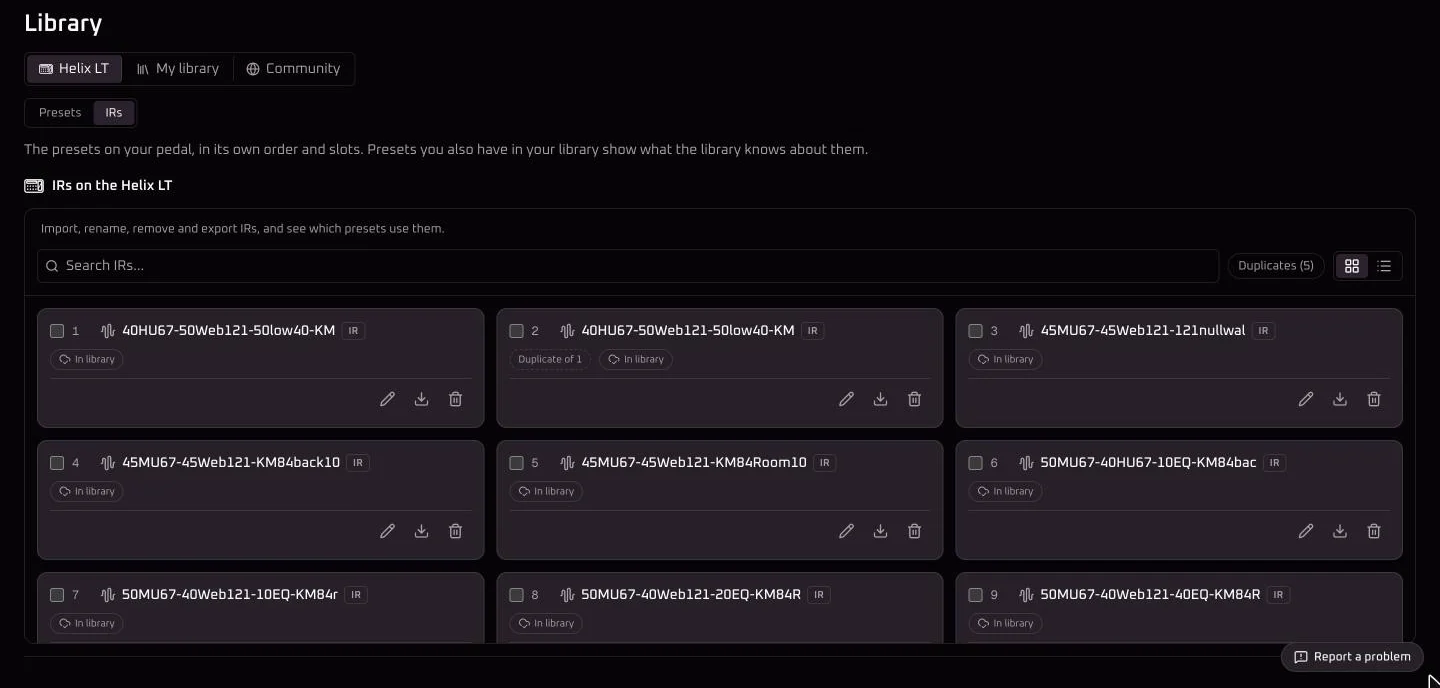
See every IR on the pedal
Connect your pedal and open the IRs tab of its library page. Every slot shows its IR, and which ones are already in your IR library. From there you can:
- import IR files of any bit depth, sample rate or length,
- rename, remove and export IRs, or export them all as one zip.
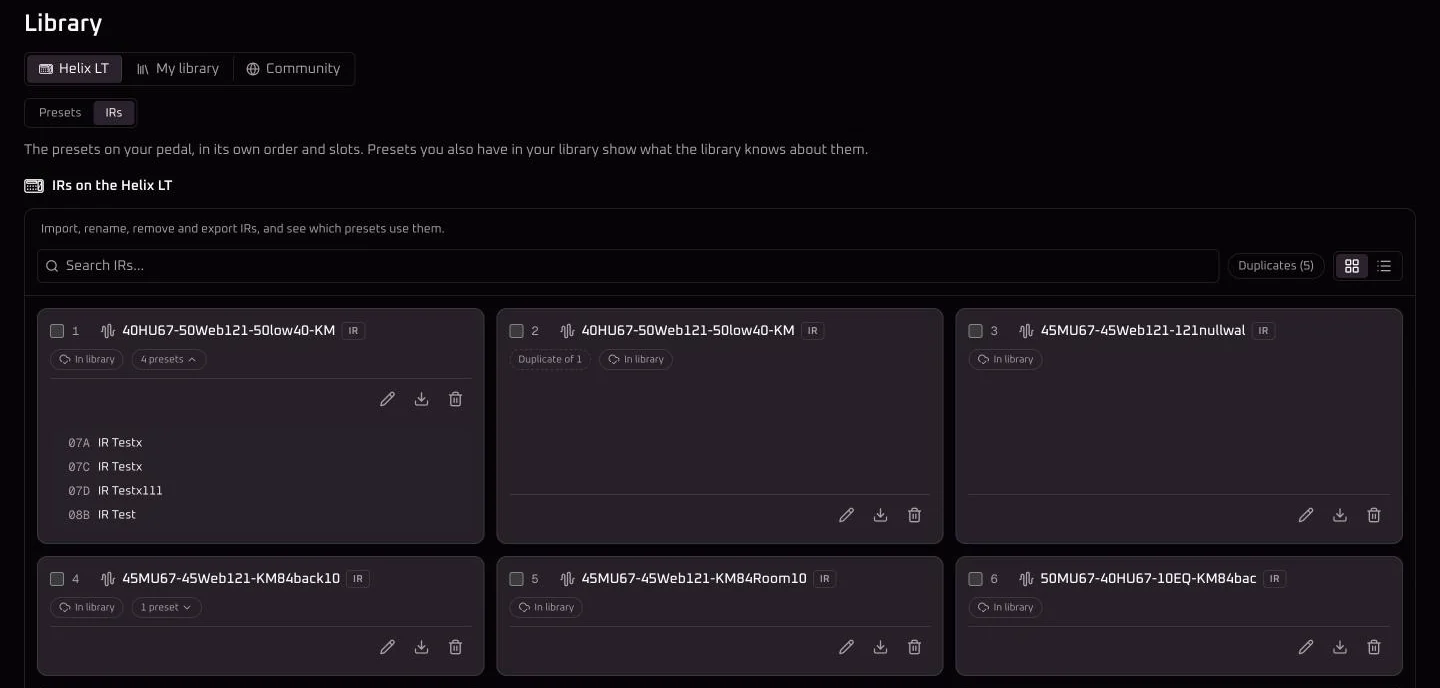
Know which presets use each IR
Choose Find which presets use each IRand Helrig reads the pedal’s presets once. After that, every IR shows how many presets use it, and opens a list of them by setlist and slot. An IR no preset uses is easy to spot.
Before you remove or replace an IR, Helrig names the presets that use it and says what they’ll play afterwards: no IR, or the new one. A rescan only reads the presets that changed since the last one.
Clear the duplicates
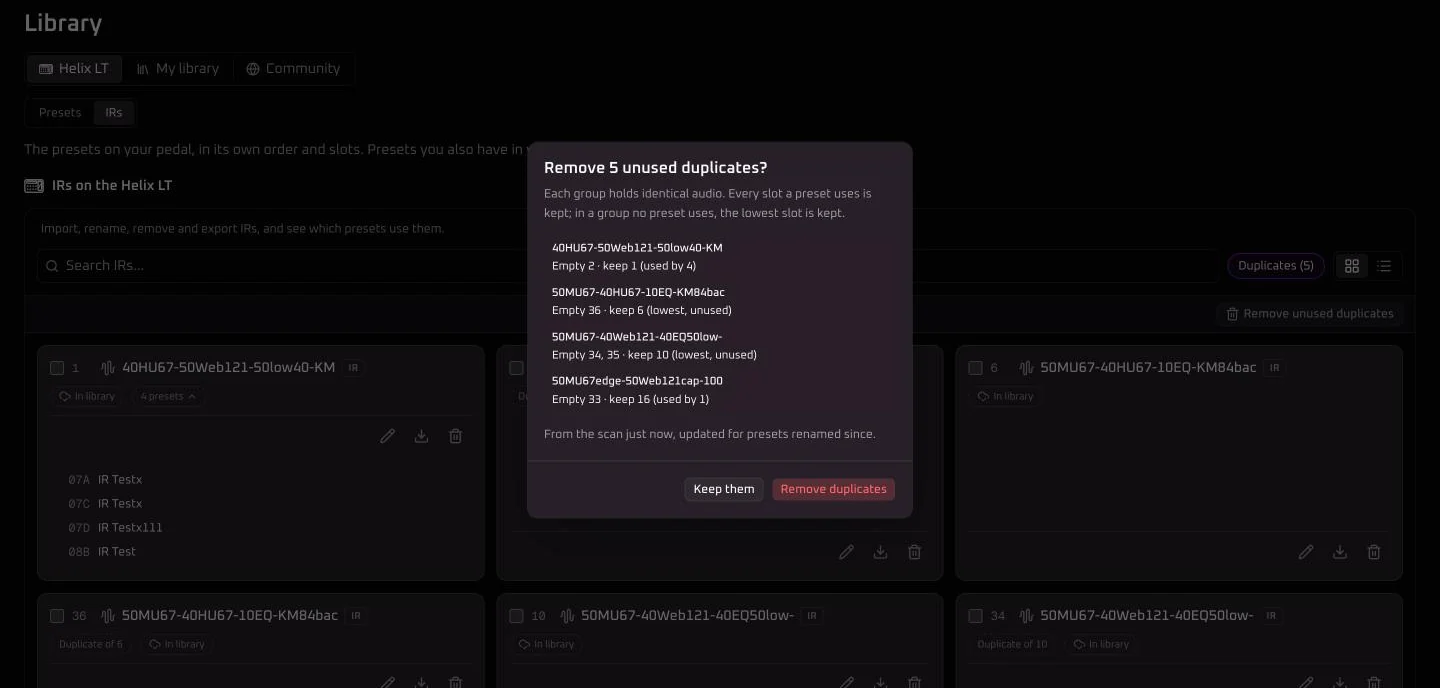
Helrig finds duplicates by their audio, not their names, so the same IR saved twice under different names is caught too. The Duplicatesfilter shows every IR that sits in more than one slot, marked “Duplicate of” the slot it copies.
Remove unused duplicates shows its plan first: every slot a preset uses is kept, and where no preset uses any copy, the lowest slot is kept. Only the rest are emptied.
Keep your IRs in your library
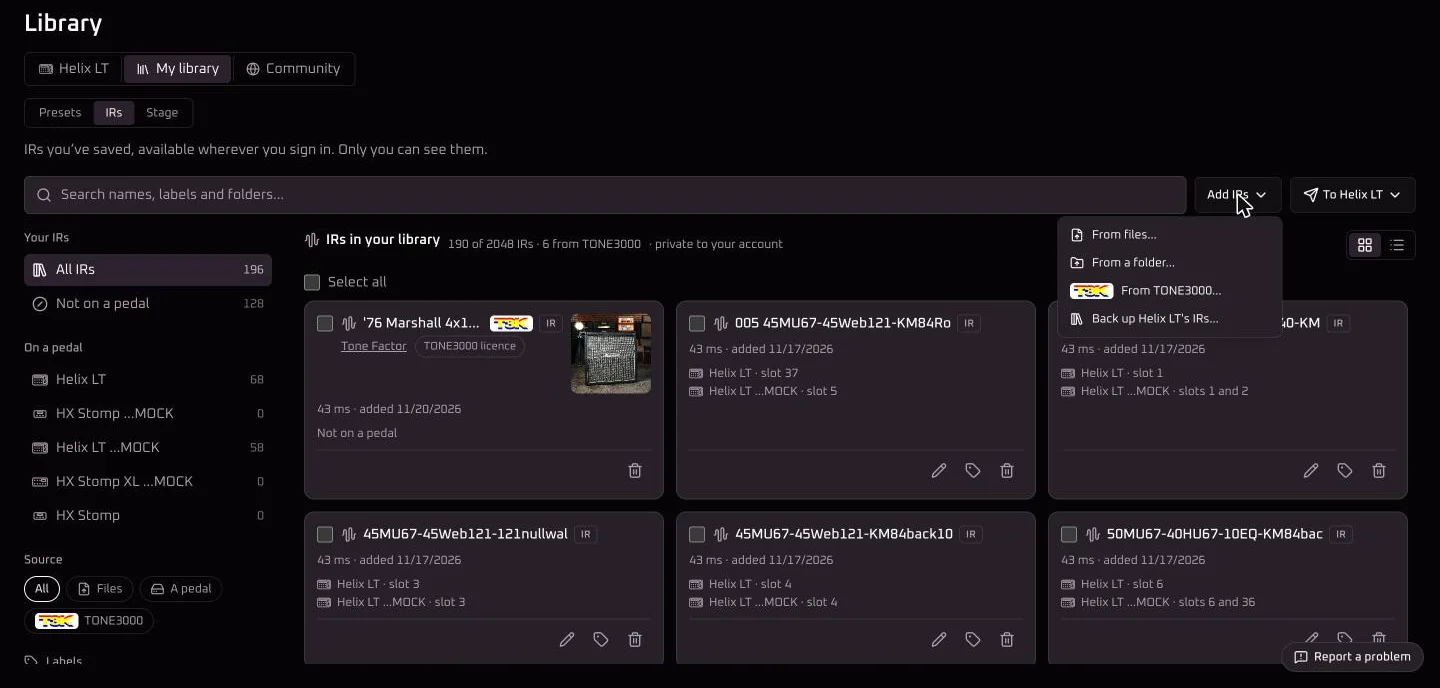
With Helrig Pro, your IRs stay in your account next to your presets: private, never shared, and never stored twice. Add IR files or a whole folder, pick IRs on TONE3000, or back up a pedal’s IRs from its IRs tab or when you import its presets. Search them, filter by pedal, source or label, and see which pedal and slot each IR is on.
Pick any IR from the IR block
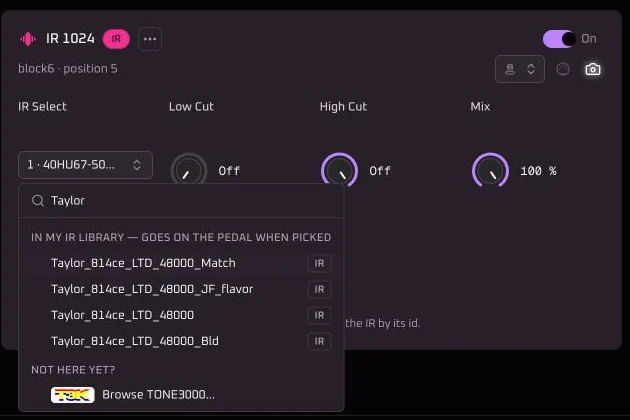
With a pedal connected, the IR block’s list shows the IRs on the pedal first, then the IRs in your library that aren’t on the pedal yet, then TONE3000. Pick one from your library and Helrig puts it in the first empty slot and points the block at it, so you hear it straight away. The list shows what’s happening while the IR goes over.
Put them on your other pedals
Tick the IRs you want and send them to the connected pedal: into the same slots as on your other pedal, into the first empty slots, or into slots you choose. Or make the whole pedal match another one. Helrig shows which presets use a slot before it replaces an IR, and writes one IR at a time.
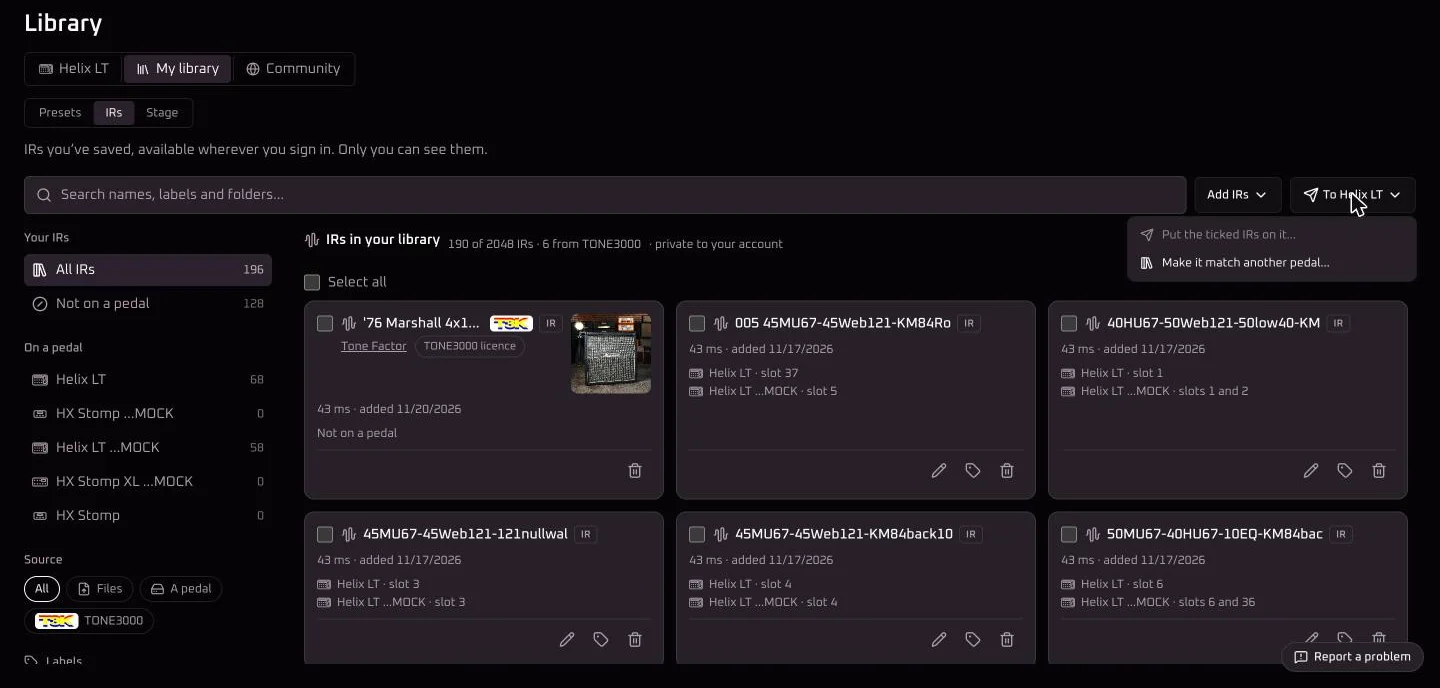
When you send a preset to a pedal, Helrig checks that every IR it uses is there and offers to put the missing ones on from your library. A preset finds its IR by what it is, not by its slot, so it can go in any free slot.
IRs inside a backup
Open a full HX Edit backup and Helrig lists the IRs inside it. Export them all as one zip, the same zip the pedal’s own Export all makes, or add them to your IR library. Listing and exporting are free, and nothing is uploaded. More on opening backups.
New IRs from TONE3000
Helrig has partnered with TONE3000. Pick an IR there from an IR block and Helrig puts it in the next empty IR slot, keeps it in your IR library, or saves the file. How it works.
What you need
- The IRs on a pedal: a Helrig app with your pedal connected, and Helrig Connect or Helrig Pro.
- The IR library, picking library IRs from the IR block, sending IRs between pedals, and presets that bring their IRs: Helrig Pro.
- The IRs inside a backup: nothing, in your browser or any Helrig app.
Questions
What does managing IRs cost?
Working with the IRs on a connected pedal needs Helrig Connect or Helrig Pro. Keeping IRs in your cloud IR library needs Helrig Pro. Listing and exporting the IRs inside a backup is free.
Which IR files can I import?
Any bit depth, sample rate or length. The pedal keeps 2,048 samples of each IR at 48 kHz, and Helrig converts the file to that when it writes it.
Are my IRs shared with anyone?
No. Your IR library is private to your account, an IR you already have is never stored twice, and sharing a preset never shares its IR files.
Can Helrig tell me which presets use an IR?
Yes. One scan of the pedal's presets, and every IR shows how many presets use it and which ones. Before you remove or replace an IR, Helrig lists the presets it would change.
How does Helrig spot duplicate IRs?
By the audio, not the name. Two slots holding the same IR are marked as duplicates even under different names, and removing duplicates never empties a slot a preset uses.
How many IRs can I keep?
Up to 2,048 in your IR library with Helrig Pro.
More
Helrig is an unofficial, independent project, not affiliated with or endorsed by Line 6 or Yamaha. Line 6, Helix and HX are trademarks of their respective owners. TONE3000 is a trademark of its owner.